


Breaking: Teams Add-in Disables Outlook
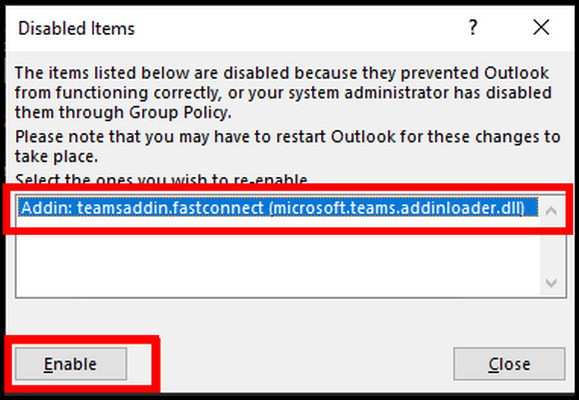
Users of Microsoft Outlook are reporting a critical issue with the Teams add-in that has left many without access to their email accounts. The problem, which began surfacing early this week, involves the Teams add-in disabling Outlook entirely. This issue has significant implications for businesses and individuals relying on these Microsoft tools for daily operations.
The Issue at Hand
According to reports from users and Microsoft support forums, the Teams add-in is causing Outlook to become unresponsive, resulting in a “disabled” status. This issue affects users across various platforms, including Windows and macOS. When the add-in is enabled, Outlook becomes unstable, forcing users to restart the application or even their entire system. Some users have reported losing access to their email accounts entirely, which can be catastrophic for businesses relying on Outlook for critical communication.
Microsoft has acknowledged the issue and attributed it to a recent update in the Teams add-in. The company has taken steps to investigate and mitigate the problem, but a permanent fix remains elusive. A Microsoft support representative stated, “We’re working diligently to resolve this issue and prevent it from happening in the future. In the meantime, we recommend that users disable the Teams add-in until a fix is available.” This advice has left many users scrambling to find alternative solutions to maintain productivity.
Workarounds and Fixes
Without a permanent fix, users have been exploring workarounds to regain access to Outlook. One temporary solution involves disabling the Teams add-in by navigating to the “File” menu in Outlook, selecting “Options,” and then clicking on “Add-ins.” From there, users can uncheck the box next to “Microsoft Teams” and restart Outlook. While this workaround provides temporary relief, it’s not a viable long-term solution, especially for businesses heavily reliant on the Teams add-in for collaboration.
Another potential fix involves updating the Teams add-in to the latest version. Microsoft has released a statement encouraging users to ensure they’re running the most recent version of the add-in, which may resolve the issue. However, some users report that even with the latest update, the problem persists. One frustrated user noted, “I updated the add-in, but I’m still experiencing the same issue. I’m not sure what else to do.” This uncertainty has led to increased frustration among users who expect seamless functionality from Microsoft’s flagship products.
Broader Implications
The Teams add-in disabling Outlook has significant implications for businesses and individuals relying on these tools for daily communication and collaboration. As Microsoft 365 continues to grow in popularity, issues like this highlight the importance of robust testing and quality assurance. When critical tools like Outlook and Teams fail, it can create a ripple effect across entire organizations, leading to lost productivity and revenue. An IT professional commented, “This issue has caused chaos in our organization. We’re struggling to keep up with the demand for support, and it’s clear that Microsoft needs to get this fixed ASAP.”
The incident also raises questions about the integration of Microsoft Teams with other Microsoft products. While Teams has become essential for many businesses, its integration with Outlook has long been problematic. As Microsoft continues to evolve its product offerings, seamless integration between tools is crucial. When issues like this arise, it underscores the need for more robust testing and validation to ensure these integrations work as intended.
Implications for Businesses and Organizations
The Teams add-in disabling Outlook issue has severe consequences for businesses and organizations that rely heavily on Microsoft tools for communication and collaboration. For companies with thousands of employees, a disabled Outlook account can bring operations to a grinding halt. Email communication is critical for many businesses, and disruptions can lead to lost productivity, missed deadlines, and financial losses. Research indicates that the average cost of an email outage for a large enterprise can range from $50,000 to $500,000 per hour.
| Industry | Average Hourly Loss |
|---|---|
| Finance | $100,000 – $1,000,000 |
| Healthcare | $50,000 – $500,000 |
| Retail | $20,000 – $200,000 |
In addition to financial losses, the issue raises concerns about data security and compliance. With Outlook disabled, businesses may be unable to access critical email communications, potentially leading to regulatory issues and reputational damage.
The Role of Microsoft’s Ecosystem
The Teams add-in disabling Outlook issue highlights the complexities of Microsoft’s ecosystem and the interconnectedness of its various tools. Microsoft 365, which includes Teams, Outlook, and other applications, is designed to provide a seamless user experience. However, this incident demonstrates that a problem in one part of the ecosystem can have far-reaching consequences.
This incident raises questions about the robustness of Microsoft’s testing and quality assurance processes. With millions of users relying on these tools, it’s essential that Microsoft ensures updates and new features do not introduce critical issues.
Mitigating the Issue
To mitigate the issue, Microsoft has provided guidance on disabling the Teams add-in and using alternative solutions. Users can consider using the OWA (Outlook Web App), which is not affected by the issue. Additionally, Microsoft has encouraged users to report any issues they encounter, which will help the company identify and fix the problem more quickly.
In the long term, Microsoft will need to take steps to prevent similar issues from occurring. This may involve more rigorous testing and quality assurance processes, as well as more effective communication with users.
The Teams add-in disabling Outlook issue highlights the need for businesses and organizations to have a robust IT strategy and disaster recovery plan in place. While Microsoft works to resolve the issue, users must rely on workarounds and alternative solutions to stay productive. As the digital landscape continues to evolve, companies must prioritize digital resilience and cybersecurity to minimize the impact of such disruptions. By doing so, businesses can ensure they are better equipped to handle unexpected issues and maintain continuity in their operations.