
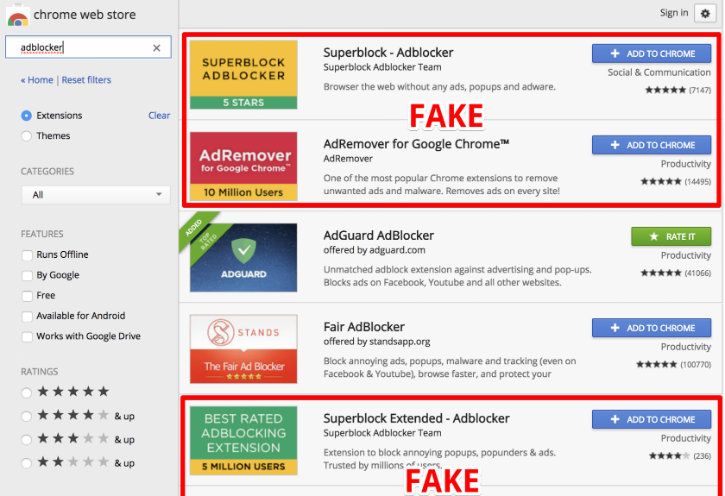


The promise was simple enough: download this Chrome extension and watch every annoying ad vanish from your screen. No more pop-ups hijacking your YouTube binge, no more banner ads chasing you across news sites. Just clean, blissful browsing. Thousands of users clicked “Add to Chrome” last week, lured by five-star reviews that felt a little too perfect. Within minutes, their laptops began to hum differently—fans spinning like tiny turbines, cursor arrows drifting without a hand on the mouse. By the time someone posted a panicked screenshot to Reddit, the fake ad blocker had already siphoned passwords, crypto-wallet keys, and a lifetime of private messages to a server registered in some Moldovan back alley. Welcome to the era when the tools we trust to protect us have become the perfect disguise for digital home invasion.
The Trojan Horse Wearing an Ad-Blocker Mask
It looked like every other extension in Chrome’s crowded marketplace: a tiny red shield icon, a generic name—”Ultra Ad Block Pro”—and a description stuffed with just enough tech jargon to sound legitimate. Security researcher Maya Patel nearly scrolled past it during her morning coffee scroll through new submissions. Then she noticed the permissions request: “Read and change all your data on all websites.” For an ad blocker, that’s like hiring a bouncer who demands the keys to every room in your house. Patel spun up a virtual machine, installed the extension, and watched the screen go dark. Not from blocked ads, but from a hidden desktop stream that flickered alive, broadcasting her entire session to an anonymous Telegram channel.
Inside the extension’s code she found a nested Russian-doll of obfuscation: JavaScript packed three layers deep, each one unpacking only when it sensed a real human behind the keyboard. Once activated, the extension quietly downloaded a second-stage payload—a sleek little remote-access Trojan dubbed ModeloRAT by the researchers who stayed up three nights tracing its callbacks. ModeloRAT doesn’t just peek through your digital curtains; it moves the furniture, raids the fridge, and leaves the faucet running. It can snap screenshots every five seconds, scrape everything you type into a browser, and—cruellest twist—inject fresh ads into the very pages it promised to clean up, earning pennies per view for its masters while you curse the websites you once loved.
From Annoyance to Asset: Your Browsing Becomes Their Crypto Mine
Most victims notice the fans first. Laptops that once purred like contented cats start howling like jet engines, batteries draining faster than happy-hour pints. That’s because ModeloRAT doesn’t stop at espionage; it hijacks the computer’s graphics card to mine Monero in the background, each hash a grain of sand added to someone else’s digital castle. College student Jenna Liu felt it during a Zoom lecture when her MacBook Pro burned her jeans. She checked Activity Monitor and found a process named “Chrome Helper (Renderer)” consuming 300% CPU. Force-quitting Chrome did nothing; the miner had rooted itself into macOS LaunchAgents, respawning like a horror-movie villain every time she rebooted.
The economics are ruthless. A thousand infected machines hashing at 60 percent CPU power nets the attackers roughly $3,200 a week—tax-free, traceable only if you can follow Monero through Tor exit nodes and mixing services. Meanwhile, Jenna’s laptop battery swelled like a balloon, warping the aluminum chassis and costing her $349 in repairs. Multiply that by thousands of users and the damage dwarfs traditional credit-card theft; instead of draining one account, they’re bleeding micro-volts from an entire grid, one compromised extension at a time.
Chrome’s Web Store has since nuked the extension, but cached installers still float on third-party sites, promoted by TikTok “tech-guru” videos that promise “a faster, cleaner internet in two clicks.” Google estimates 80,000 users installed it before the takedown; independent tallies peg the number closer to 200,000. The disconnect highlights a sobering truth: the gatekeepers of our digital neighborhoods can’t patrol every alley, especially when criminals can simply re-skin the same malware, upload under a new name, and buy a fresh batch of five-star reviews for the price of a pizza.
The Anatomy of ModeloRAT: From Tiny Extension to Full‑Blown Spy
When Maya Patel peeled back the layers of the “Ultra Ad Block Pro” code, she uncovered a playbook that reads like a modern‑day espionage manual. The first line of JavaScript is a classic loader stub—a few dozen characters that download an encrypted payload from a domain that resolves to a fast‑flux network in Eastern Europe. Once the payload lands, it spawns a PowerShell command that decrypts the core of ModeloRAT using a hard‑coded AES‑256 key.
What makes ModeloRAT especially insidious is its modular architecture. The initial binary is merely a “beacon” that checks the host’s environment (OS version, installed browsers, active VPNs) and then pulls in additional modules on demand:
- Keylogger – captures every keystroke, including two‑factor codes entered into authentication apps.
- Screen‑grabber – takes high‑resolution snapshots every 30 seconds, stitching them into a timeline that can be replayed by the attacker.
- Crypto‑wallet scraper – parses local storage files for wallets such as MetaMask, Exodus, and hardware‑wallet backup phrases.
- Persistence engine – writes a scheduled task to
HKCU\Software\Microsoft\Windows\CurrentVersion\Runand registers a hidden Chrome extension update URL, ensuring the RAT survives reboots and even Chrome updates.
All communication is tunneled through Telegram’s Bot API, a choice that gives the operators a low‑cost, globally distributed command‑and‑control (C2) channel. The messages are wrapped in Base64, then split into 4096‑byte chunks to evade simple pattern‑matching IDS signatures.
Security researchers at CISA have catalogued ModeloRAT under the umbrella of “policies/”>policy framework, which, while robust, still relies heavily on automated scans and community reporting. Malicious extensions can slip through by using “dynamic code loading”—the initial upload contains only benign code, and the dangerous payload is fetched later, evading static analysis tools.
Another blind spot is the permission model. Chrome now groups permissions into “host permissions” and “optional permissions,” but the UI still presents them as a single checkbox list. Users who click “Accept” often do not read the fine print, especially when the extension’s description claims “necessary for optimal ad‑blocking.” The result is a perfect storm where a seemingly harmless utility gains carte blanche to read, modify, and transmit every bit of data that passes through the browser.
The Ripple Effect: From Personal Breach to Corporate Fallout
While the headline‑grabbing stories focus on stolen crypto wallets and personal emails, the true cost of ModeloRAT spreads far beyond the individual. Consider a remote employee who installs the fake ad blocker on a corporate‑issued laptop. The RAT silently harvests the employee’s SSO cookies, granting the attacker a foothold inside the organization’s internal network.
Once inside, the attacker can:
- Pivot to privileged accounts using harvested credentials.
- Deploy lateral movement tools such as PsExec or SMBRelay to compromise other endpoints.
- Exfiltrate intellectual property—design files, source code, financial spreadsheets—by piggybacking on the browser’s HTTPS traffic.
- Plant ransomware or additional backdoors, turning a single browser extension infection into a full‑scale breach.