
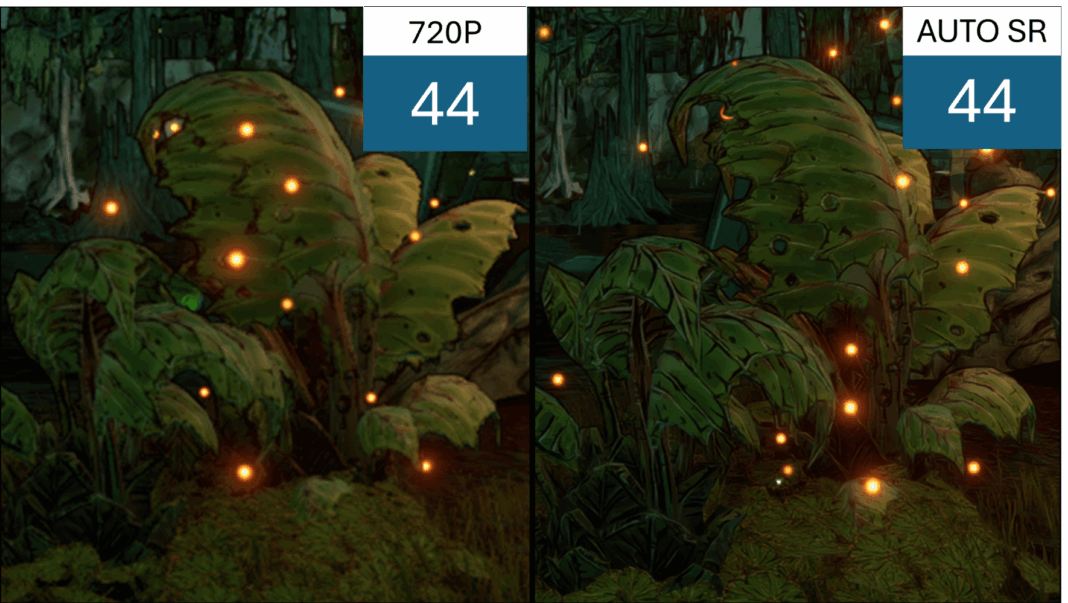


Listen up, gamers—if you’ve been lugging around a handheld PC hoping for that elusive “console-like” smoothness, Microsoft just dropped the update we’ve all been whispering about. We’ve been living in a golden age of portable gaming hardware, but let’s be real: the software hasn’t always kept pace with the ambition. That changes today. Microsoft has officially pulled the curtain back on Auto SR, their new AI-powered resolution upscaling feature, and it’s poised to be the secret sauce that finally makes devices like the Surface Pro 11 and the latest crop of Copilot+ PCs feel like true, high-performance gaming rigs.
The Magic Behind the Pixels: What is Auto SR?
For those of you who don’t spend your weekends deep-diving into tech specs, let me break it down: Auto SR (Automatic Super Resolution) is essentially Microsoft’s answer to the “upscaling wars.” We’ve seen NVIDIA’s DLSS and AMD’s FSR dominate the landscape for years, forcing games to render at lower resolutions before using clever algorithms to sharpen the image back up. It’s the ultimate trade-off—you sacrifice a few raw pixels to gain those precious, buttery-smooth frame rates. But until now, this was largely a game-by-game implementation that required developer support or specific GPU hardware.
What makes Auto SR different—and frankly, a bit of a game-changer—is its integration at the OS level. By leveraging the NPU (Neural Processing Unit) found in the latest Snapdragon X Elite chips, Microsoft is offloading the heavy lifting of image reconstruction away from the GPU. This isn’t just about making your games look “good enough”; it’s about maintaining visual fidelity while drastically reducing the strain on your battery. For a handheld device, where every watt counts, this is the holy grail. We’re talking about a seamless experience that kicks in automatically, meaning you don’t have to spend twenty minutes tweaking settings menus just to get a playable experience on your morning commute.
Performance Gains and the “Handheld” Reality Check
I’ve been tracking the performance chatter since the announcement, and the early data is looking incredibly promising. By rendering at a lower internal resolution and using the NPU to intelligently upscale, Auto SR is allowing users to hit those coveted 60 FPS targets in titles that previously stuttered on integrated graphics. It’s the kind of performance jump that turns a “maybe” game into a “must-play” on the go. There’s something undeniably satisfying about watching a demanding AAA title run with the fluidity we usually associate with a high-end desktop, all while the device stays relatively cool to the touch.
However, let’s keep our feet on the ground. While the tech is impressive, the “Auto” in Auto SR is the real star here. Microsoft is aiming for a “set it and forget it” experience, which is exactly what the mainstream market needs. We’re moving away from the era where you needed a degree in computer engineering just to run Cyberpunk 2077 on a portable device. By automating the upscaling process, Microsoft is lowering the barrier to entry for casual players who just want to jump into a game without the headache of manual optimization. It’s a bold move to bake this into the Windows ecosystem, and it’s one that signals Microsoft is finally taking the handheld gaming market as seriously as it takes its Xbox division.
But how does it hold up under the pressure of a marathon gaming session? That’s where the conversation gets interesting. While the frame rate boosts are undeniable, the real test is how the AI handles fast-paced motion and fine details. We’ve all seen “AI-upscaled” images that look a bit, well, smeary. Microsoft claims that their NPU-driven approach is more efficient and provides a crisper output than traditional software-based upscaling, but I’m curious to see how it handles the nuances of different art styles. Are we going to see ghosting during high-speed action sequences, or has the NPU truly mastered the art of prediction?
The Hardware Shift: Why NPUs are the New MVP
If you’ve been following the industry trends, you know that the term NPU (Neural Processing Unit) has been thrown around like confetti at a wrap party. But why does it matter for your gaming experience? Historically, your handheld’s GPU was doing double duty: rendering complex 3D environments and trying to handle post-processing tasks like upscaling. It’s the digital equivalent of trying to run a marathon while solving a complex math equation—eventually, you’re going to run out of steam. Or, in the case of a handheld, you’re going to watch your battery percentage plummet in real-time.
By shifting the AI-driven upscaling workload to the NPU, Microsoft is essentially creating a dedicated lane for image reconstruction. This allows the GPU to focus entirely on the game’s core rendering, while the NPU handles the “magic” of making those frames look crisp at higher resolutions. It’s a symbiotic relationship that keeps the thermals lower and the longevity of your session higher. For a deep dive into the architecture of these silicon advancements, you can check out the official technical specifications provided by the chip manufacturers.
| Feature | Traditional Upscaling (GPU-based) | Auto SR (NPU-based) |
|---|---|---|
| Processing Load | Shared with GPU | Offloaded to NPU |
| Battery Impact | High | Low/Optimized |
| Compatibility | Game-specific | OS-level (Broad) |
| Thermal Output | High | Moderate |
The “Set It and Forget It” Era of Gaming
We’ve all been there: you boot up a new title on your handheld, and you’re immediately greeted with a settings menu that looks like the cockpit of a 747. You spend forty minutes toggling anti-aliasing, shadow quality, and texture filtering, only to realize you’ve ruined the frame rate. Auto SR is the antidote to this “settings fatigue.” Because this is an OS-level feature, it’s designed to recognize when you’re in a gaming environment and optimize the visual output without you needing a degree in computer engineering. For more on this topic, see: What George R. R. Martin’s .
This is a massive win for accessibility. Not every gamer wants to be a tinkerer; some of us just want to pick up a device during a commute and lose ourselves in a world for thirty minutes. By standardizing the upscaling process through Windows, Microsoft is lowering the barrier to entry for high-end mobile gaming. It’s about time our software caught up to the sleek, premium hardware we’re carrying in our backpacks. To learn more about how Windows 11 integrates these AI capabilities, you can visit the Breaking: Discover the Real-Life Settings .
For those interested in the broader implications of AI in computing, you can read more about the development of neural processing standards at the HP Just Erased Its Name .
At the end of the day, gaming is about the experience—the immersion, the story, and the thrill of the win. If a bit of AI wizardry can make those experiences smoother, more portable, and less taxing on our hardware, then I’m all in. We’ve spent years waiting for the “portable PC” promise to be fully realized, and with the rollout of Auto SR, it feels like we’ve finally crossed the finish line. Grab your controller, update your drivers, and see for yourself; the future of handheld gaming just got a whole lot brighter.